
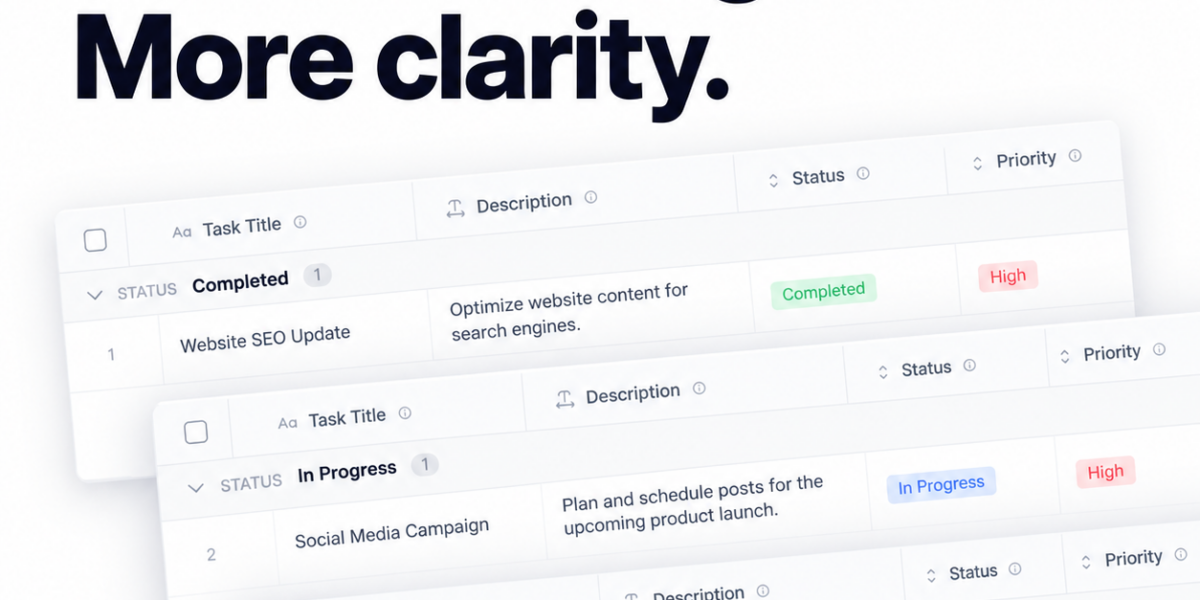
Enhance Your Organization with Fruitask Table (Group)
In today’s fast-paced business environment, having an effective system for organizing tasks and data is crucial. With the Fruitask Table (Group), you can transform a long table of records into clear, manageable sections. This innovative feature allows you to group information based on a chosen column, making it easier to review your data and prioritize tasks.
Why Grouped Tables Matter
Managing large sets of data can be overwhelming, especially when you need to analyze the information efficiently. Here’s where grouped tables come into play:
- Focused Review: By grouping related records, you can focus on specific categories without distractions from unrelated data.
- Status Overview: Easily review the status of various tasks or projects by filtering records based on their state.
- Creative Workload Management: Group your creative tasks by owner to understand each team member’s workload and availability better.
- Efficient Task Categorization: Organize your deliverables by category for simplified tracking and management.
Key Features of Fruitask Table (Group)
The Fruitask Table (Group) feature is designed to streamline your workflows and enhance collaboration across teams. Here are some of its key functionalities:
- Expandable Groups: Users can expand or collapse groups based on their needs, allowing for personalized views of their data.
- Underlying Data Maintenance: When you group records, the underlying data remains intact. This means you can always access complete information when needed.
- Customizable Views: Choose how to group records – by status, owner, category, or any other relevant parameter for your project.
How to Use Fruitask Table (Group) Effectively
Utilizing the Fruitask Table (Group) functionality can significantly improve your task management process. Here are some tips on how to maximize its effectiveness:
- Define Your Grouping Criteria: Before diving in, think about how you want to organize your tasks. Whether by status, deadlines, or creative ownership, clarity in grouping criteria is essential.
- Regular Updates: Make it a habit to update your groups regularly. Keeping your data fresh ensures that your overviews reflect the current status of projects.
- Engage Your Team: Involve team members in the grouping process, allowing everyone to have a say in how they view their tasks. This collaborative approach fosters better communication.
- Use Tags and Filters: Complement the grouping feature with tags and filters for an even more granular review of your tasks. This will enhance your workflow efficiency.
Applications Across Different Scenarios
The capabilities of the Fruitask Table (Group) make it an invaluable asset in various situations. Here are some scenarios in which you can apply it effectively:
- Marketing Campaigns: Review campaign tasks by status, allowing for quick identification of tasks either needing immediate attention or in progress.
- Creative Projects: Monitor creative workloads by owner, enabling project managers to balance tasks and avoid bottlenecks.
- Product Development: Track deliverables according to category to ensure all product aspects are addressed systematically.
The Future of Task Management with Fruitask
As the landscape of project management evolves, having tools like the Fruitask Table (Group) at your disposal helps you stay agile. By optimizing how you view and manage tasks, you can ensure transparency within your teams and make better decisions based on accurate data interpretation.
Conclusion
In conclusion, the Fruitask Table (Group) is an essential feature designed for modern organizational challenges. By leveraging grouped tables, you can achieve a clearer status overview of projects, manage creative workloads effectively, and categorize deliverables for improved focus. Embrace the power of organization and take your project management to the next level with Fruitask.
Start using the Fruitask Table (Group) today to gain clear insights into your projects and improve your team’s productivity!
