
Get Fruitask on
every device
Install Fruitask as a desktop app, use it on your phone, or supercharge your browser. One platform, everywhere you work.
Download Fruitask for desktop
Native desktop builds for Windows, macOS, and Linux — a dedicated app window with offline support and notifications.


Free · Open the file after downloading to install · Fruitask desktop
Install Fruitask as a native app
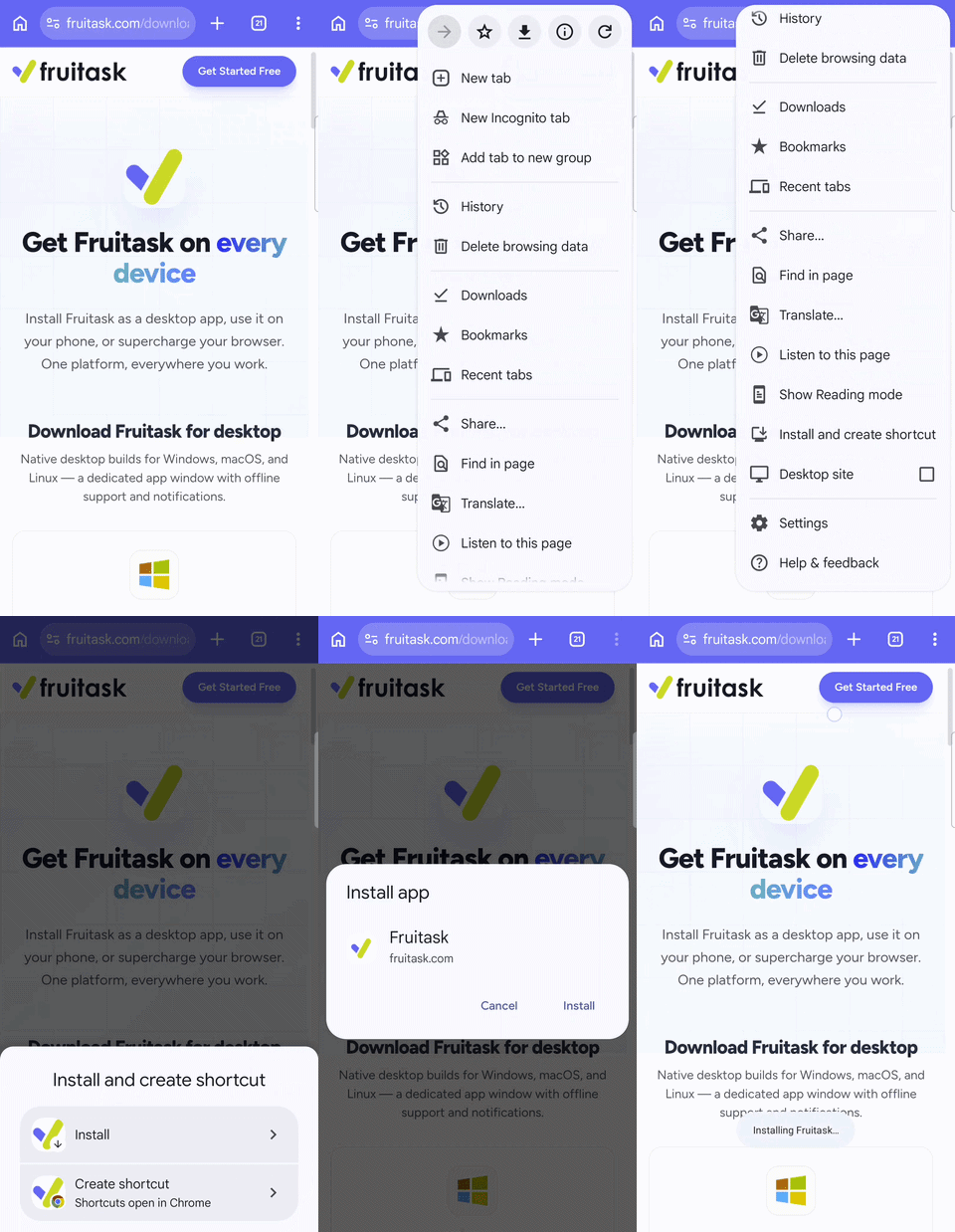
Get a dedicated window, faster load times, and desktop notifications. Fruitask installs instantly from your browser — no app store, no download, no waiting.
Use the install option in your browser's address bar or menu to install Fruitask.
Chrome / Edge
Click the install icon (⊕) in the address bar → "Install Fruitask"
Safari (iOS / macOS)
Tap the Share button → "Add to Home Screen"
Instant Launch
Open from your dock, taskbar, or home screen — no browser needed.
Own Window
Full-screen workspace without browser tabs or distractions.
Push Notifications
Get notified about messages, mentions, and updates in real-time.
Works Offline
Access cached data and keep working even without an internet connection.
Auto Updates
Always on the latest version — updates happen seamlessly in the background.
Zero Install Size
No heavy downloads. Installs in seconds and uses minimal disk space.
Fruitask Extension
Quick access panel
Fruitask in your browser toolbar
Quick-add tasks, clip web pages to notes, and get notifications — all without leaving the page you're on. The Fruitask browser extension puts your workspace a click away.
Coming Soon
The browser extension is currently in development. Stay tuned!
- Quick-add rows to any workspace from any webpage
- Clip web content directly into Fruitask Notes
- View and respond to notifications
- Jump to any workspace, note, or chat in one click
- Works with Chrome, Edge, Firefox, and Brave
Native apps & store releases
Dedicated native apps and browser extensions are actively in development. All coming soon.
iOS App
App Store
Native iPhone & iPad experience with iOS shortcuts, widgets, and Siri integration. Your Fruitask workspace in your pocket.
Android App
Google Play
Full-featured Android app with home screen widgets, notification badges, and deep system integration.
Chrome Extension
Chrome Web Store
Toolbar button for Chrome and Edge. Quick-capture rows, clip web pages to notes, and view notifications without leaving your tab.

Firefox Add-on
Firefox Add-ons
The same powerful extension experience built natively for Firefox and other Gecko-based browsers.
Safari Extension
App Store
Fruitask extension for Safari on macOS and iOS. Quick access to your workspace directly from the browser toolbar.
Works everywhere you do
Fruitask is a progressive web app. One codebase, every platform, always up to date.
Windows
Windows 10+
macOS
macOS 11+
Linux
Any distro
Mobile
iOS & Android
Ready to get started?
Create your free account or install Fruitask as a desktop app right now.